A Shopify-like checkout for WooCommerce, without moving to Shopify
Shopify's checkout is one page: wallets at the top, the email first, addresses that fill in as you type. OnePageCheckout is a free WooCommerce plugin that brings that flow to the store you already run. Your gateways, taxes and shipping rules stay as they are, and deactivating the plugin brings the standard checkout back.
Free on wordpress.org, no account needed. Works on the classic and the block checkout.
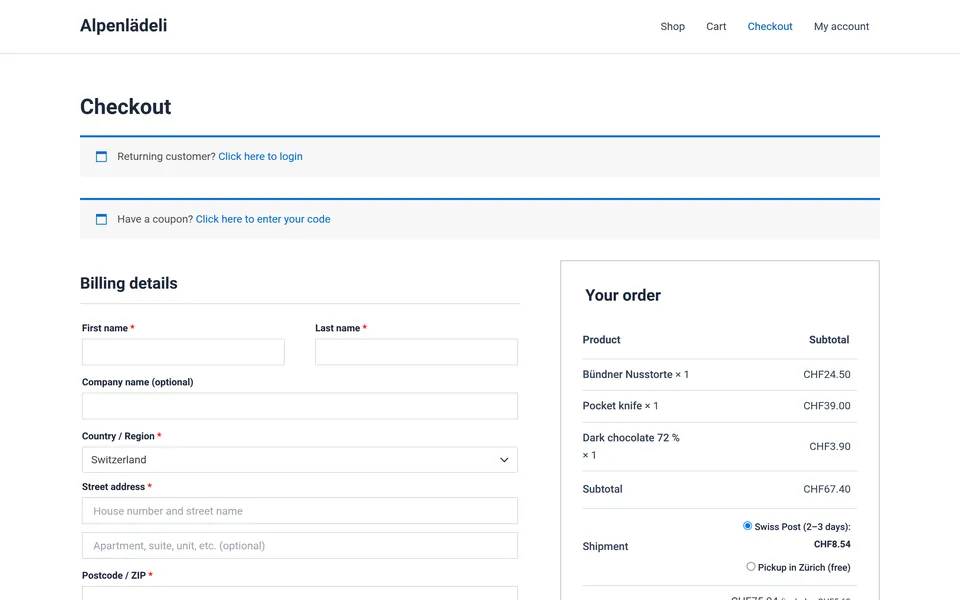
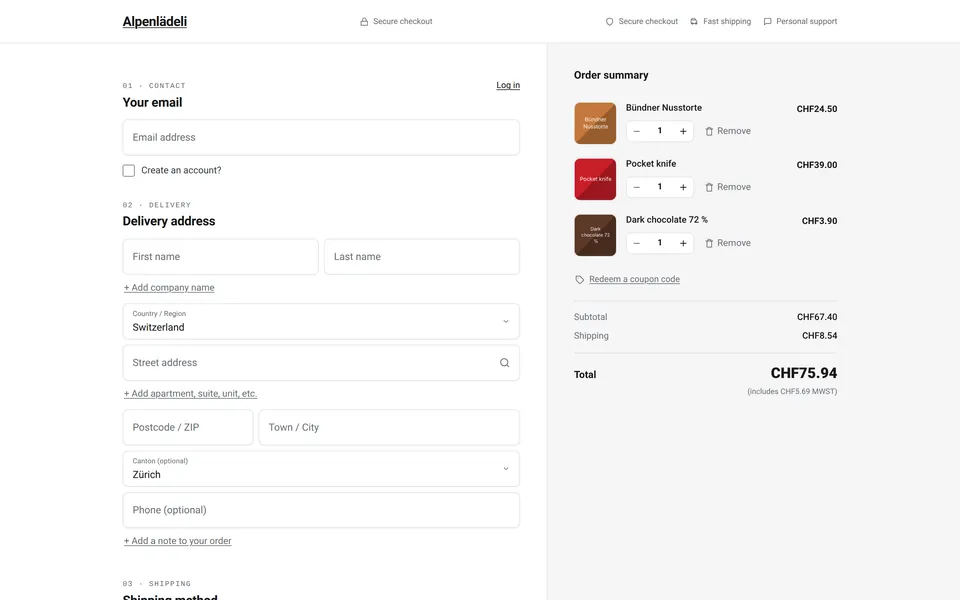
Can WooCommerce have a Shopify-like checkout? Mostly, yes. What buyers notice on Shopify (one page, wallets first, address suggestions, no menu to wander off into) is page design, and a plugin can rebuild that page on WooCommerce. The one thing that stays on Shopify is Shop Pay. This page shows the stock WooCommerce checkout in both of its versions, what Shopify does differently, and OnePageCheckout, the plugin we built to close the gap.
We are TrafficFlow, an agency in Zurich, and we make OnePageCheckout. Every WooCommerce screenshot on this page comes from the same test shop with the same cart: a Bündner Nusstorte, a pocket knife and a bar of dark chocolate, CHF 75.94 including Swiss Post shipping. All measurements are our own, taken on 30 October 2026.
The default WooCommerce checkout, as your customers see it
WooCommerce ships two checkouts. Since WooCommerce 8.3 (November 2023), new stores get the block checkout (WooCommerce 8.3 release notes). Stores that existed before then kept their checkout when they updated, so many still run the classic one, built on the [woocommerce_checkout] shortcode. We shot both on WooCommerce 11.2.1 with the Astra theme and changed nothing else.
The classic checkout
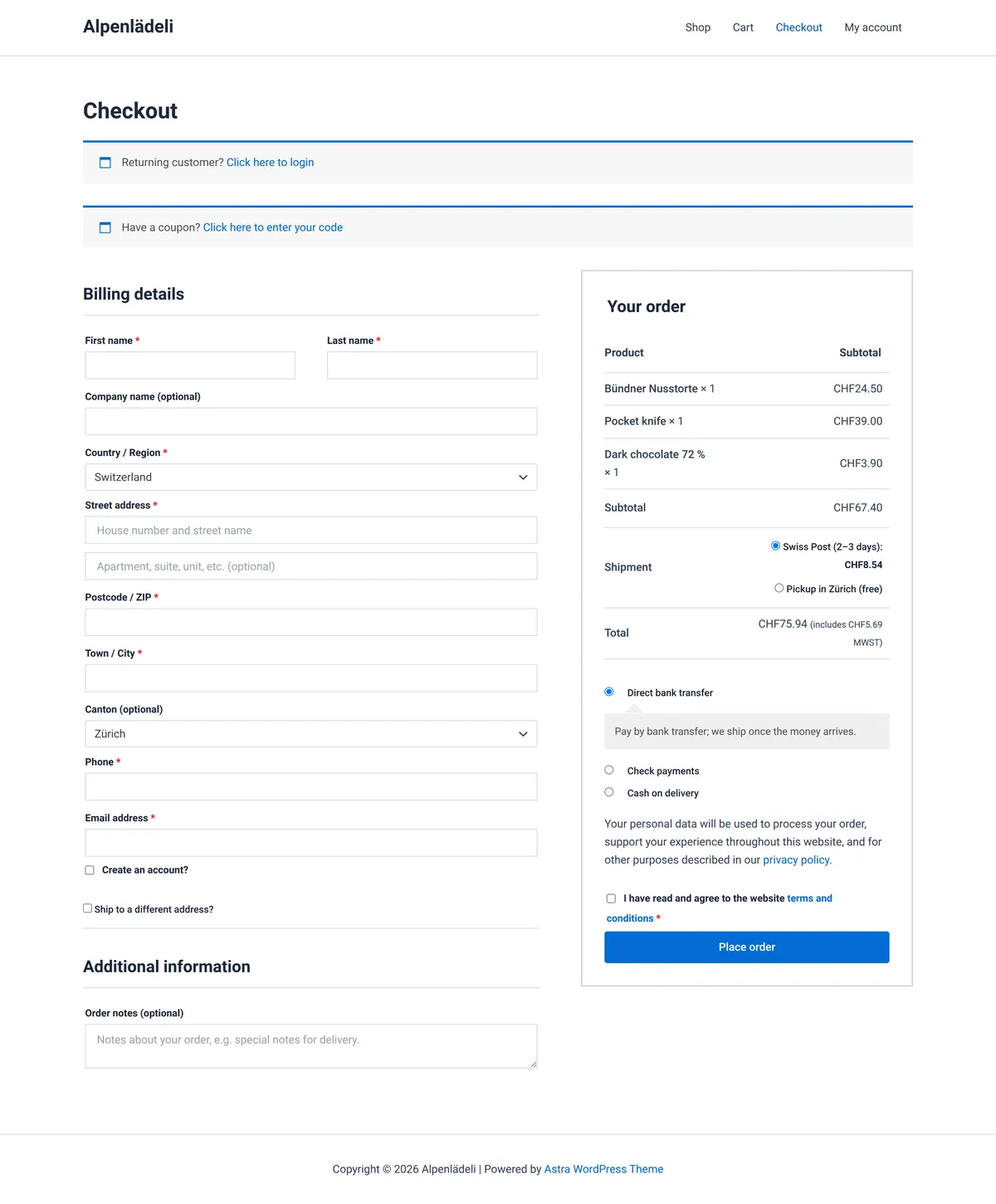
What a first-time buyer meets, top to bottom:
- The theme's header and footer. Shop, Cart, Checkout and My account stay in the menu. Each one is a way out of the purchase.
- Two notice bars before the form. "Returning customer? Click here to login" and "Have a coupon? Click here to enter your code".
- "Billing details" with the email at the end. First name, last name, company, country, street, apartment, postcode, city, canton, phone, and only then the email address. Phone is marked required.
- Extra decisions. "Create an account?", "Ship to a different address?", then a separate "Additional information" section with an order-notes box.
- 12 visible fields plus 8 radios and checkboxes.
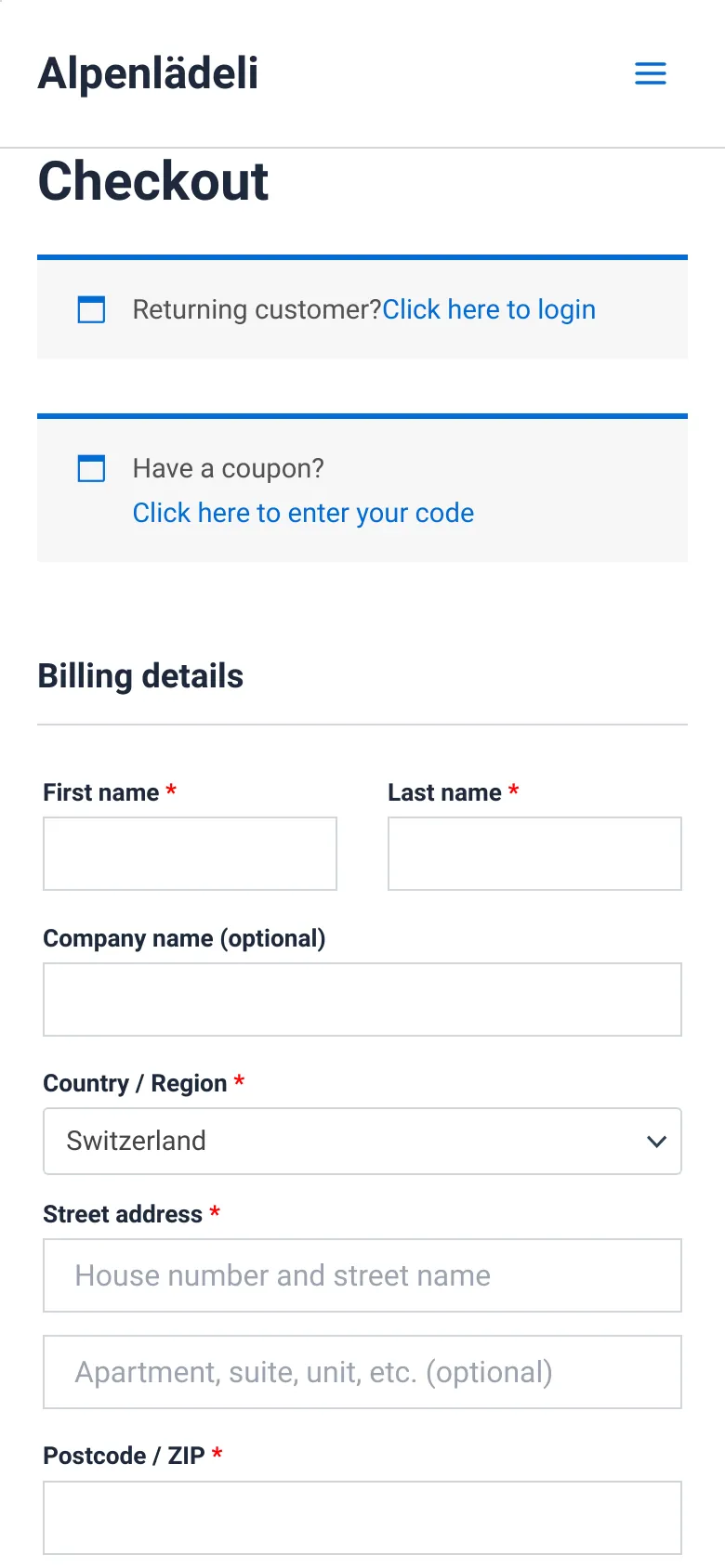
On a phone it gets longer. The header, the page title and the two notice bars take the top third of the first screen, and the total is nowhere in sight. The Place order button sits 2,512 px down the page, almost three full screens of scrolling.
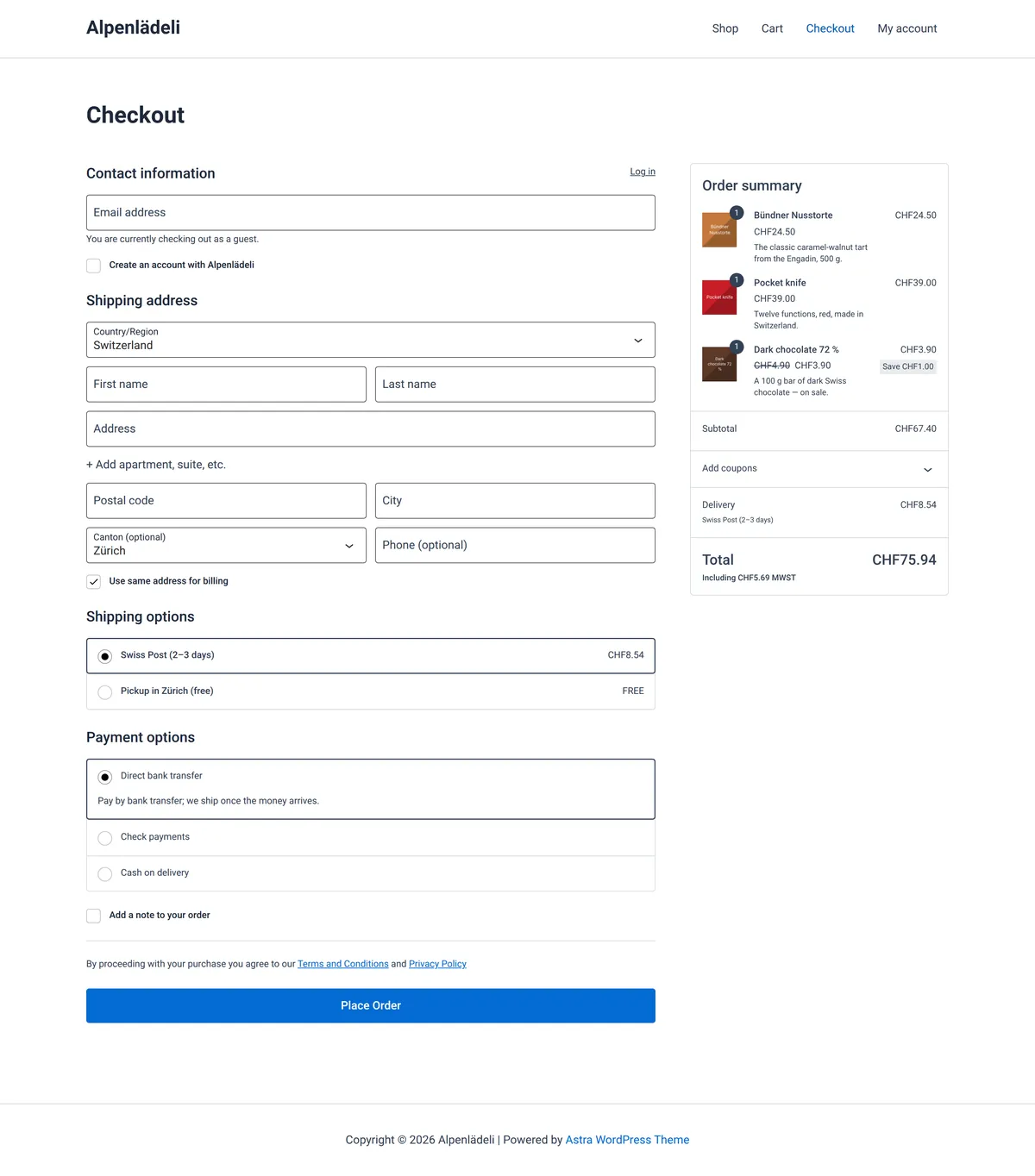
The block checkout, the default for new stores since WooCommerce 8.3
The block checkout fixed a lot of this. Many guides on this topic still show only the classic page, so here is the current default as well.
What it gets right
- The email comes first, under "Contact information", with a "Log in" link beside it.
- Labels sit inside the fields. The apartment line hides behind "+ Add apartment, suite, etc.", the phone is optional and the order note is a checkbox. That leaves 9 visible fields, the same number as our plugin.
- Shipping and payment are bordered option lists, and the order summary on the right shows product images.
- On a phone, the summary folds into a bar with the total at the top.
- There is an express-payment area for gateways that support it.
What is still missing
- The theme's header menu and footer stay on the page.
- WooCommerce core has no address suggestions. Every address is typed by hand.
- The summary lists the items, but quantities can't be changed there and nothing can be removed without going back to the cart.
- On a phone, the full order summary appears a second time above Place Order. The page is 2,432 px long and the button sits 2.7 screens down.
- The look is your theme's. Changing it means the block editor or custom CSS.
WooCommerce's engine is not the problem. Orders, stock, taxes and gateways work. The page the buyer touches is where Shopify is ahead.
What Shopify's checkout gets right
Shopify runs one checkout for every store on its platform, so every change it makes reaches all of them at once. Five things about it are worth copying.
One page by default, since October 2023
Shopify made its one-page checkout the default on 2 October 2023 (Shopify changelog). Merchants can still switch back to the three-page layout (Shopify Help Center).
Wallets before the form
Express buttons sit at the very top: Shop Pay, Apple Pay, Google Pay or PayPal, depending on the store. A buyer with a saved wallet never touches a form field.
Email first, then delivery
Contact comes before the delivery address. A browser with saved details can then fill the whole form in one go, which works when each field carries the right autocomplete value, as Google's web.dev form guidelines recommend.
Address suggestions, switched on by default
Shopify's address autocompletion is active by default and covers 23 countries, Switzerland, Germany and Austria among them (Shopify Help Center). Baymard's benchmark finds that 55% of sites don't offer fully automatic address lookup, and in one round of its testing 9% of hand-typed shipping addresses contained typos or misspellings (Baymard Institute).
Nothing to click away to
The header is little more than the store's logo. No menu, no footer full of blog links. On a phone the order summary folds into one bar with the total and opens with a tap (Shopify Help Center).
What you can't copy, and what Shopify charges for it
If you are weighing a move to Shopify for the checkout alone, these are the facts to weigh it with.
- Shop Pay stays on Shopify.
In a Shopify Community thread, Shopify's support wrote that "Shop Pay is only available to merchants using Shopify Payments, and Shopify Payments is only available to merchants using our platform directly" (Shopify Community, January 2024). So no WooCommerce plugin can add it. Apple Pay, Google Pay and PayPal from your own gateway can fill the same row.
- The conversion claim is Shopify's own.
Shopify says its checkout outperforms WooCommerce's "by up to 17%" (Shopify). Its footnote names a study "completed in partnership with a Big Three global management consulting company" and publishes no method or sample. Read it as a vendor claim. Shopify also doesn't say what makes up the difference: Shop Pay is one part you can't copy, the page layout is one you can.
- Customization depends on the plan.
Shopify's pricing page lists checkout customization as "Limited" on Basic, Grow and Advanced, and "Full" only on Plus, which starts at thousands per month (Shopify pricing).
- Other payment providers cost extra.
If you use a third-party payment provider instead of Shopify Payments, Shopify charges a transaction fee of 2% (Basic), 1% (Grow), 0.6% (Advanced) or 0.2% (Plus) on top of your provider's own fees (Shopify pricing). On $20,000 a month in sales, the Basic plan's 2% is $400 a month.
- Moving is a migration.
Products, customers, order history, URLs and the plugins you rely on all have to move or be replaced.
OnePageCheckout: a Shopify-like checkout for the WooCommerce store you already run
OnePageCheckout is a one-page checkout plugin for WooCommerce. It redesigns two pages, the checkout and the order confirmation. Everything behind them stays WooCommerce's own: gateways, shipping zones, tax rules, coupons and fields added by other plugins keep running through WooCommerce itself, and orders land in WooCommerce the same way they always did.
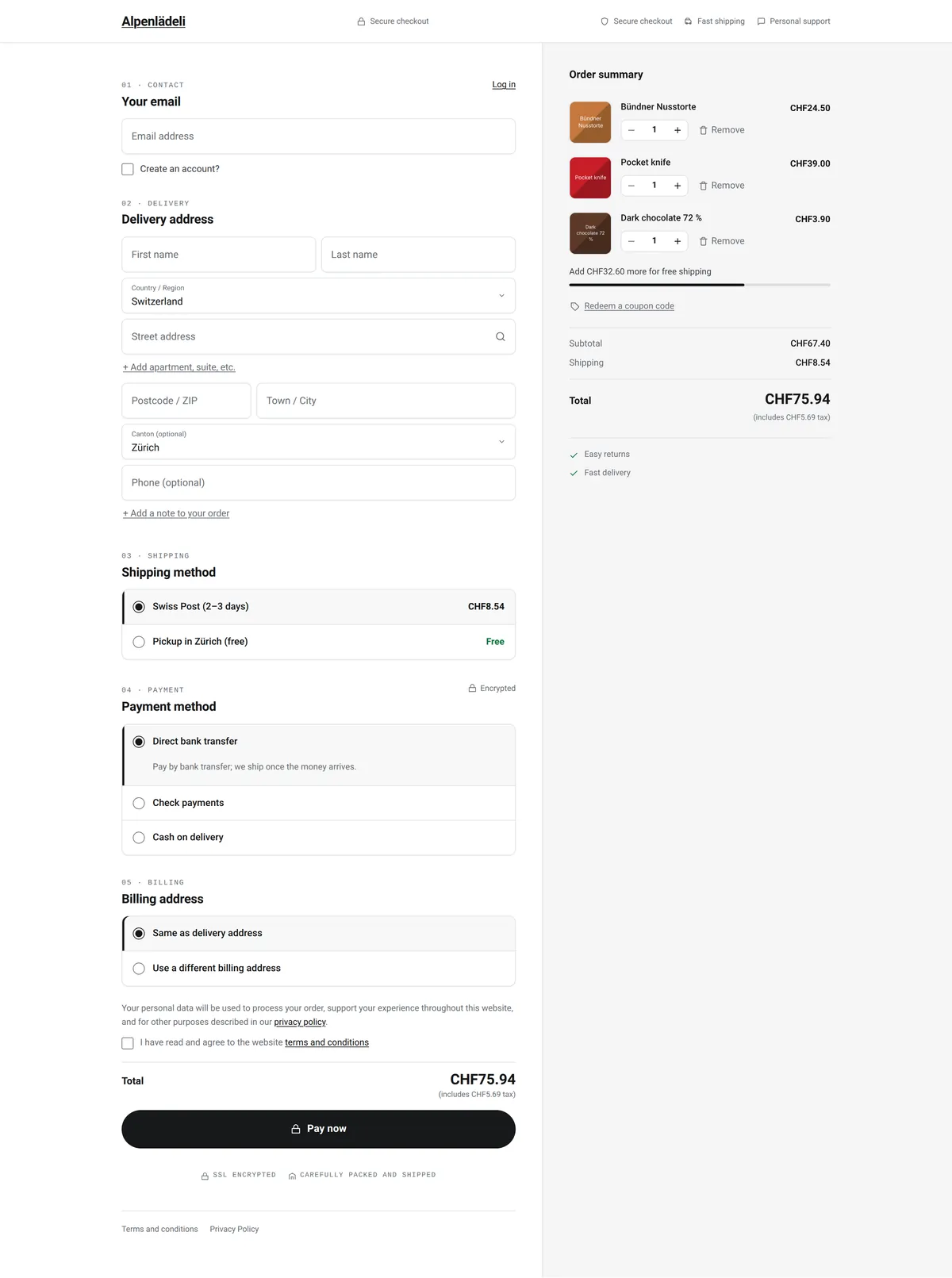
- Logo, badge, your selling points. No menu.
- Email first, log in on the page
- Address suggestions, no Google key
- Editable cart in the summary
- Shipping and payment as cards
- Total right above Pay now
One page, from email to Pay now
Five numbered sections in one column: 01 Contact, 02 Delivery, 03 Shipping, 04 Payment, 05 Billing. Shipping and payment methods are large cards. Billing defaults to "Same as delivery address". The total with its tax note sits right above the Pay now button, so nobody pays without seeing the number. Nothing reloads between sections.
Company, apartment and order note sit behind "+ Add" links. On our test shop that leaves 9 visible fields: three fewer than the classic checkout, the same as the block checkout.
Express payment row first
If your payment gateway provides express buttons, Apple Pay or Google Pay for example, OnePageCheckout puts them in their own row above the email field. If it provides none, there is no row and no empty gap.
Address autocomplete in the WooCommerce checkout, without a Google key
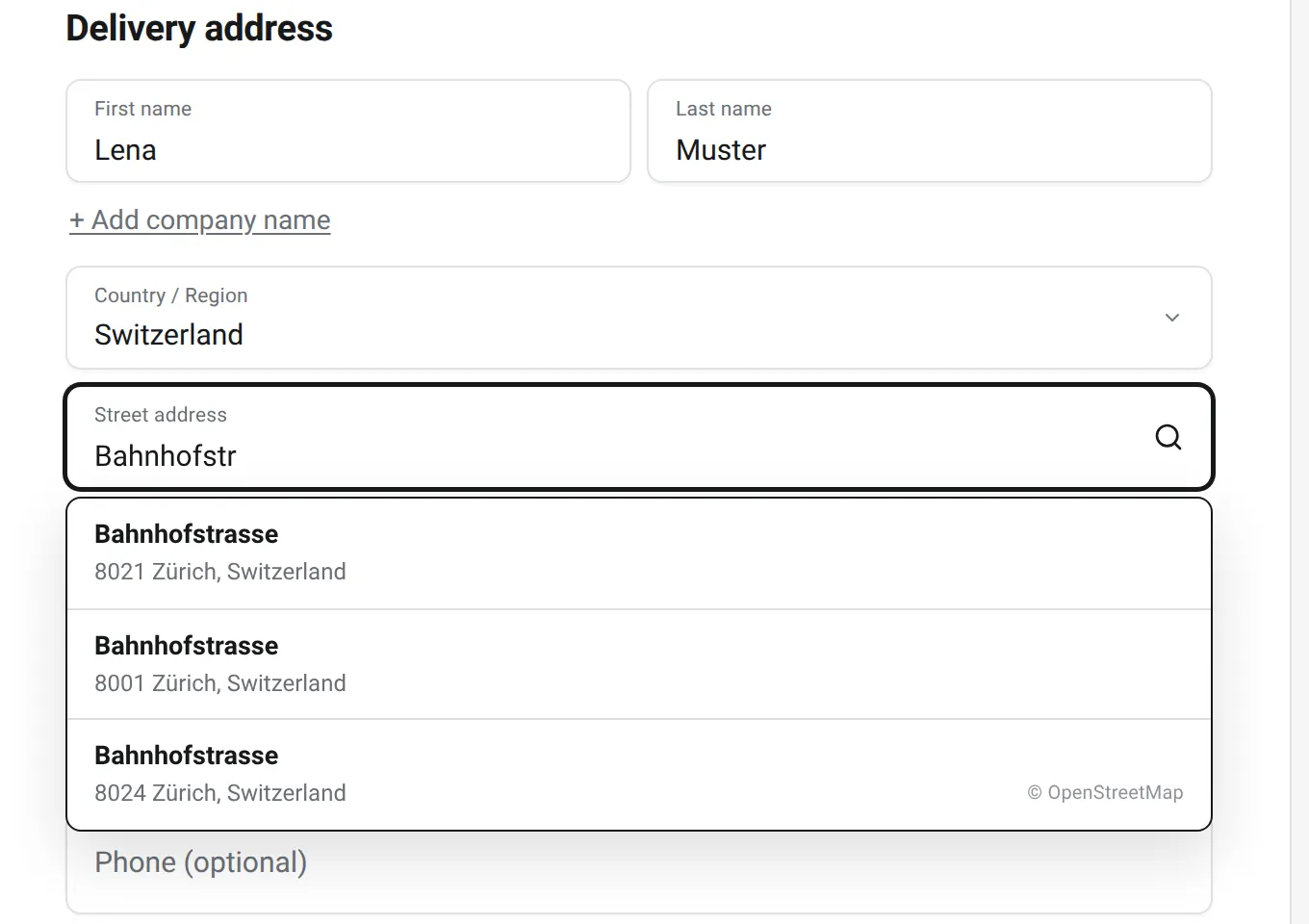
A customer types "Bahnhofstr" and gets three streets in Zürich. One tap, then "1", then a house number, and street, postcode and city are filled.
- Free: 500 address lookups a month. Turn it on with one click on the Autocomplete tab. Nothing is sent anywhere before that click. A lookup is one address, which typically takes 5 to 10 searches as the customer types. After 500, customers type their address by hand until the 1st of the next month, and the checkout keeps working.
- Where the data comes from: our own geo service, on our own server in Germany, built on OpenStreetMap for the whole world. For Switzerland and Liechtenstein it also includes the official building-address register published by swisstopo. Suggestions are strongest in Switzerland, Germany, Austria and Liechtenstein.
- Privacy: what customers type is not stored, and nothing goes to Google unless you add your own key in Pro. How address lookups are handled.
- Pro: 5,000, 25,000 or 100,000 lookups a month depending on the plan, and the option of your own Google Places key.
- Street
- —
- Postcode
- —
- Town
- —
- Country
- —
Type a street in Switzerland, Germany or Austria. Suggestions come live from our geo service, no API key.
The cart lives in the checkout
Turn on the editable cart (one switch in the settings, off by default) and each line in the order summary gets a quantity stepper and a Remove link. A "Redeem a coupon code" link opens the coupon field either way. On desktop the summary stays in view while the customer scrolls.
Returning customers sign in on the page
The "Log in" link next to the email field opens a login box above the checkout. Guests ignore it and carry on, or tick "Create an account?".
A header with nothing to click away to
Your logo, a "Secure checkout" badge and your own selling points (three by default). The theme's menus and footer are gone. Under Pay now there is a trust row, and at the bottom only Terms and Privacy.
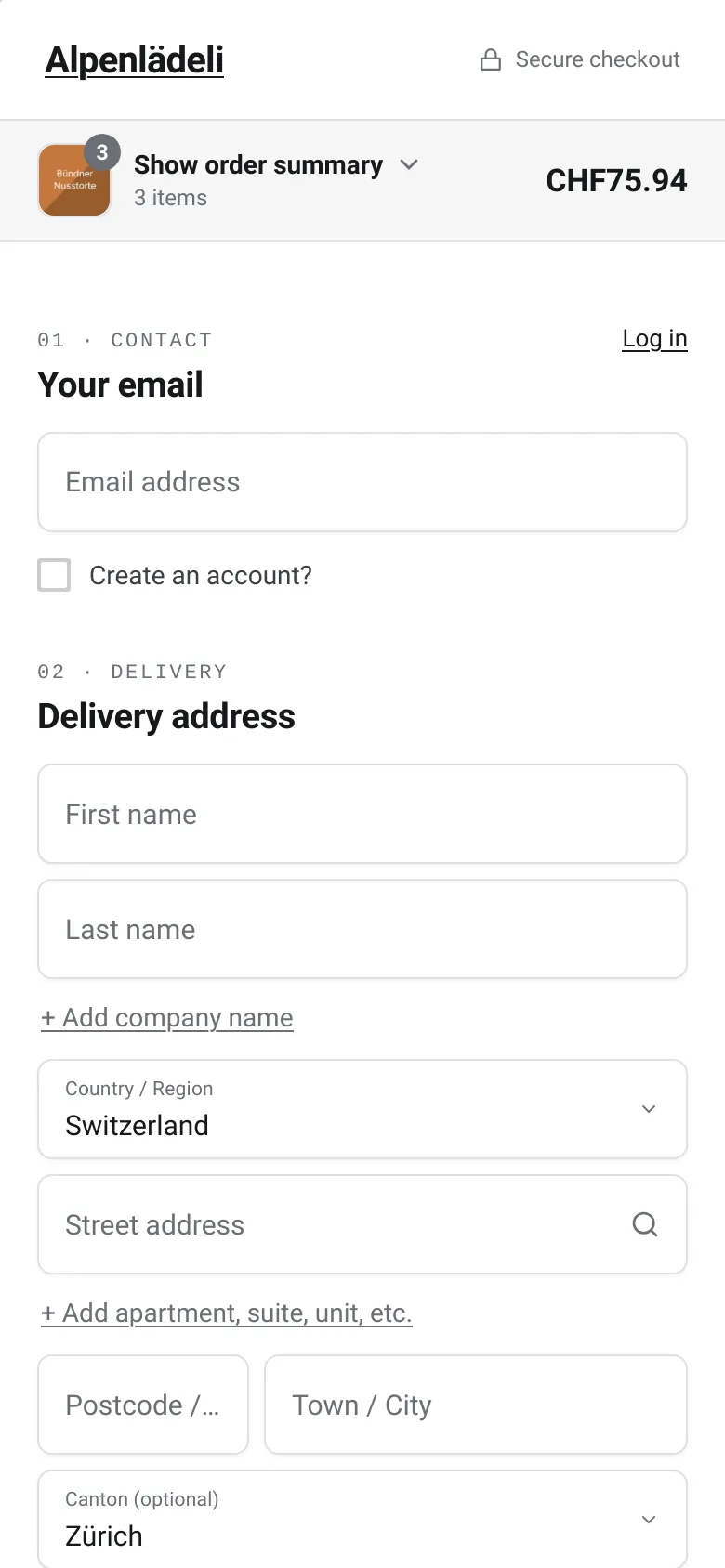
On a phone, the summary folds into one bar
"Show order summary · 3 items · CHF75.94". The form starts right below it. On our test cart the phone page is 2,121 to 2,162 px long. Compared with the stock checkout of the same type, that is 19% shorter on classic and 13% shorter on block. Foldable phones are their own case: see the checkout on foldable phones.
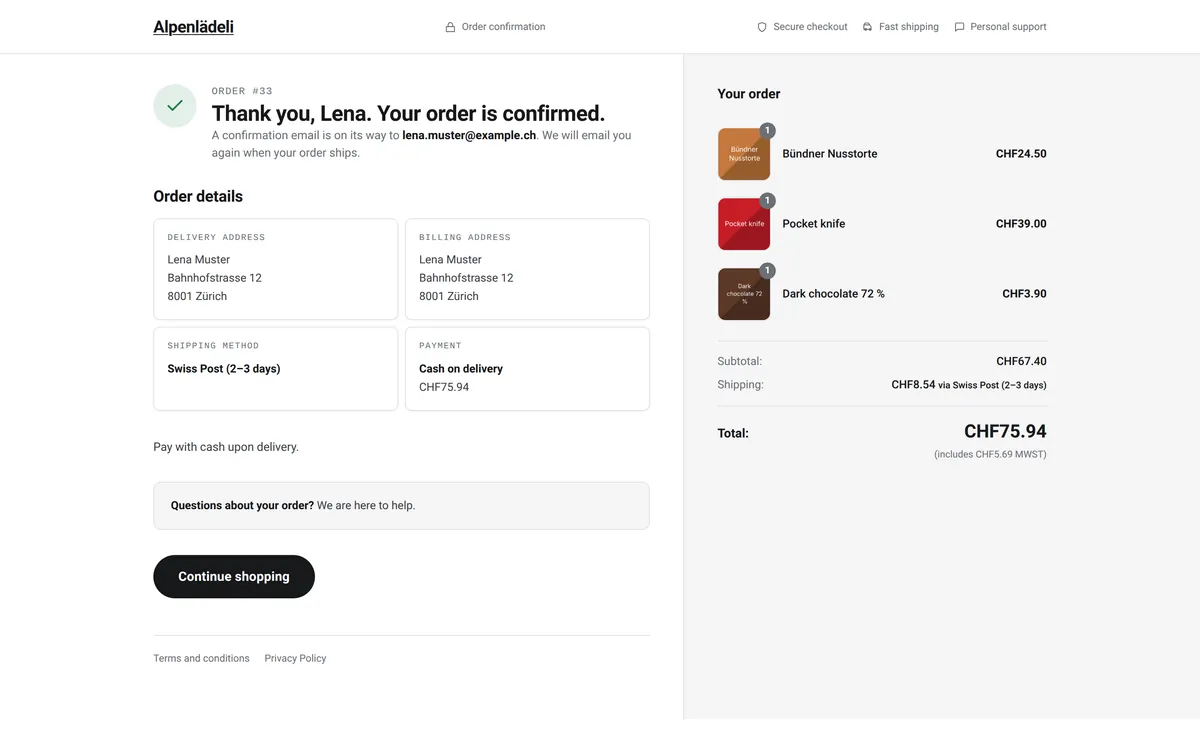
A confirmation page in the same design
"Thank you, Lena. Your order is confirmed." Then the order number, the delivery and payment details as cards, the gateway's instructions and a help box ("Questions about your order? We are here to help."). Pro adds a progress tracker and a "What happens next" block.
Classic or block checkout: both, automatically
A shortcode checkout page gets the design on top of WooCommerce's own classic form and scripts. A block checkout page runs the same design natively on the WooCommerce Store API (WooCommerce 9.8 or newer). The plugin picks the right one, and you don't migrate either way.
Remove it and you're back to stock
Deactivate the plugin and the standard WooCommerce checkout returns immediately, with no data changes. Your settings stay saved until you delete the plugin.
Shopify vs WooCommerce checkout, side by side
The WooCommerce and OnePageCheckout columns come from our own screenshots of the same cart. The Shopify column comes from Shopify's help center, its pricing page and its standard one-page checkout.
| Feature | Default WooCommerce | Shopify | WooCommerce + OnePageCheckout |
|---|---|---|---|
| Layout | Classic: one page, billing form plus order table. Block: one page, two columns | One page by default since October 2023; three-page optional | One page, five numbered sections, summary column on desktop |
| Express pay | Block: express area when the gateway supports it | At the very top, before contact | Row above the email field when your gateway provides buttons |
| First field | Classic: first name (email comes last). Block: email | ||
| Visible fields on our test cart | Classic 12, block 9 | Not measured | 9 |
| Address suggestions | None in core | Active by default, 23 countries | Hosted, no Google key, 500 lookups a month free; strongest in CH, DE, AT, LI |
| Header | Your theme's menu and footer | Store logo, no menu | Logo, "Secure checkout", your selling points; no menu or footer |
| Change quantities in checkout | No | No, in the cart | Yes, with the editable cart switched on; remove items and add coupons too |
| Order summary on phones | Classic: below the form. Block: bar with total at the top | Bar with total at the top | Bar with item count and total at the top |
| Design control | Theme, block editor or CSS | "Limited" below Plus, "Full" on Plus | Logo, accent color, button shape, selling points, trust row and pay-button text in the admin, with live preview. Pro adds presets, layout controls and custom CSS |
| Payment providers | Any WooCommerce gateway | Shopify Payments, or a third-party provider plus a 2% to 0.2% Shopify fee | Your existing WooCommerce gateways, no fee from us |
| Shop Pay | No | Yes, with Shopify Payments | No |
| Price | Included | Part of the Shopify plan | Free on wordpress.org; Pro from $49 a year or $129 once |
| Undo | n/a | n/a | Deactivate, stock checkout returns |
Checked 30 October 2026. WooCommerce 11.2.1 with the Astra theme; Shopify facts from help.shopify.com and shopify.com/pricing.
Proof you can check yourself
Try the live demo
The live demo checkout puts a sample cart into a real WooCommerce checkout running OnePageCheckout Pro, with address suggestions on. The demo gateway charges nothing, so place an order and look at the confirmation page too.
What we measured
Same shop, same cart, same theme, measured on 30 October 2026. Empty form, page just loaded. Desktop is Chromium at 1440×900; the phone is WebKit with the iPhone 13 profile at 390×844. Heights are in CSS pixels.
| Feature | Stock classic | Stock block | OnePageCheckout, classic | OnePageCheckout, block |
|---|---|---|---|---|
| Visible form fields | 12 | 9 | 9 | 9 |
| Page length on a phone | 2,658 px | 2,432 px | 2,162 px | 2,121 px |
| Pay button on a phone, in screens of scrolling | 2.98 | 2.70 | 2.31 | 2.27 |
| Page length on desktop | 1,740 px | 1,637 px | 1,974 px | 1,933 px |
| CSS files loaded | 5 | 9 | 2 | 4 |
| HTML size | 51 KB | 76 KB | 37 KB | 40 KB |
What the numbers say, and what they don't:
- Phones: OnePageCheckout is the shortest of the four, with the Pay button about 0.4 screens higher than on the block checkout and two thirds of a screen higher than on classic.
- Desktop: it is taller. The billing choice and the total line sit above Pay now, where stock classic puts Place order in the side column. We don't claim less scrolling on desktop.
- No checkout, ours included, shows the Pay button on the first screen.
- Page weight on the block checkout is about equal: 75 requests and 774 KB with OnePageCheckout, 80 requests and 809 KB without. It loads fewer stylesheets because it drops the theme's CSS on the checkout, and its HTML is smaller.
What it runs on
- WordPress 6.7 or newer, WooCommerce 9.4 or newer (9.8 or newer for the block checkout), PHP 7.4 or newer.
- Our pre-release test run, 30 October 2026: real orders on WordPress 7.1.3, WooCommerce 11.2.1, Astra and PHP 8.3, on the classic and the block checkout, in desktop Chromium and the iPhone browser engine (WebKit).
- WPML and Polylang are supported.
Make your WooCommerce checkout like Shopify's in four steps
No code, no page builder. The setup guide has the details.
Install the free plugin
In WordPress, go to Plugins → Add New Plugin, search for "TrafficFlow OnePageCheckout", then Install and Activate. WooCommerce must be active. Your checkout page switches to the one-page design right away.
Make it yours
Open WooCommerce → OnePageCheckout. Add your logo, accent color and button shape, write your selling points, the trust row and the pay-button text. The live preview beside the settings shows the result before you save.
Turn on address suggestions
On the Autocomplete tab, click Turn on. That's the 500 free lookups a month. Mention the address service in your shop's privacy policy.
Place one test order
Use your own payment method, check the confirmation page, and find the order in WooCommerce → Orders. If your checkout page uses the block checkout on a WooCommerce version older than 9.8, the settings offer a one-click switch to classic.
How it compares with other Shopify-style checkout plugins
OnePageCheckout is not the only way to get a Shopify-style checkout on WooCommerce. If you are comparing CheckoutWC, FunnelKit or Fluid Checkout, or looking for a CheckoutWC alternative, here is how they differ on the points that tend to decide it. Prices are entry prices for one site, as listed on each vendor's pricing page on 30 October 2026.
| Feature | Free version | Block checkout | Address autocomplete | Entry price | Lifetime option | If you stop paying |
|---|---|---|---|---|---|---|
| WooCommerce block checkout (core) | It is core | It is the block checkout | None | $0 | n/a | n/a |
| CheckoutWC | Lite on wordpress.org (multi-step; one-page in paid plans) | Replaces the checkout page and "doesn't use the WooCommerce Blocks checkout system" (its wordpress.org listing) | ZIP/postal lookup in Lite; Google or Fetchify autocomplete in paid plans, with your own API key | $149 a year | None listed | Not stated (plans include one year of updates and support) |
| FunnelKit | Free Funnel Builder plugin with a one-page checkout and templates | Its own checkout templates, edited in Gutenberg or a page builder | Google Address Autocomplete in paid plans | $99.50 for the first year, then $129 | None listed | Not stated |
| Fluid Checkout | Lite on wordpress.org | Replaces the Checkout block "for compatibility" | Google Address Autocomplete add-on, included in the paid bundle | €99 a year | None listed | Plugins keep working, including PRO features; updates and support stop |
| OnePageCheckout | Free on wordpress.org, including address suggestions and the express row | Same design on classic and block, natively on the Store API | Hosted, no Google key: 500 a month free, 5,000 to 100,000 in Pro; own Google key optional in Pro | $49 a year | $129 once | Checkout and Pro features keep working; updates, support and hosted autocomplete need an active license |
Where the others are stronger: CheckoutWC's paid plans add a side cart, order bumps and post-purchase offers, and FunnelKit builds whole sales funnels with one-click upsells and A/B tests. OnePageCheckout does the checkout and the confirmation page, plus an order bump in Pro, and nothing else. Fluid Checkout has more than 20,000 active installs and 159 ratings on wordpress.org. We listed ours there on 28 October 2026 and have no reviews yet.
Questions people ask
Can I use Shopify's actual checkout on WooCommerce or WordPress?
No. Shopify's checkout only runs on Shopify. Its Buy Button can embed products on a WordPress page, but buyers then pay in Shopify's checkout, you need a Shopify plan, and products, stock and orders live in two systems. A Shopify-like checkout plugin keeps everything in WooCommerce and copies the flow instead.
Can WooCommerce use Shop Pay?
No. Shop Pay needs Shopify Payments, and Shopify Payments is only available to merchants on Shopify's own platform, as Shopify's support confirms in its community forum. What you can do is put Apple Pay, Google Pay or PayPal from your existing gateway at the top of the checkout, where Shopify shows Shop Pay.
Did Shopify switch to a one-page checkout?
Yes. One-page checkout became Shopify's default on 2 October 2023. Merchants can still choose the older three-page layout in their checkout settings.
Is a one-page checkout better than a multi-step one?
Not automatically. Baymard's long-standing finding is that "a one page checkout won't necessarily perform better than a comparatively optimized multi-step checkout" (Baymard Institute). What helps is fewer fields, a sensible order, no reloads and no detours. OnePageCheckout is built around those four.
Can I make my WooCommerce checkout look like Shopify's for free?
Yes. The free version on wordpress.org includes the full one-page checkout on both checkout types, the confirmation page, the express row, inline login, the editable cart and 500 address lookups a month. No limit on orders, products or shops, and no branding of ours on your checkout.
Do I need code or a page builder?
No. Logo, colors, selling points, trust row and button text are settings with a live preview. Developers get hooks and an extension API if they want them.
Does it work with the WooCommerce block checkout and my payment gateway?
Yes. It runs on the classic checkout and on the block checkout (WooCommerce 9.8 or newer) and picks the right one from your checkout page. Payment, shipping and tax stay WooCommerce's own, so your gateways keep running through WooCommerce as they do now.
Will it slow down my store?
On the block checkout, we measured about the same page weight as stock: 75 requests and 774 KB against 80 and 809 KB. It loads fewer stylesheets because it drops the theme's CSS on the checkout. On a phone the page is 13% to 19% shorter than the stock checkout of the same type. The plugin only runs on the checkout and confirmation pages.
What happens if I deactivate it, or my license expires?
Deactivate it and the standard WooCommerce checkout returns immediately, with no data changes. If a Pro license expires, nothing breaks: the Pro features you turned on keep working. A renewal is what keeps updates, support and hosted address autocomplete coming.
Is the WooCommerce checkout really worse than Shopify's?
Not in the engine. The default page lacks some of what Shopify's offers, such as address suggestions and a header without a menu, and that is page design. Shopify claims its checkout outperforms WooCommerce's by up to 17%, from a study run with a consulting firm whose method it hasn't published. Independent research doesn't compare the two platforms. What it does show is how much checkout design matters: Baymard estimates the average large e-commerce site can gain a 35.26% higher conversion rate through better checkout design alone (Baymard Institute).
Does address autocomplete store what customers type?
No. The typed text goes to our geo service in Germany, is used to return suggestions and is not stored. Logs contain only shortened IP addresses, no typed text, and are deleted after 7 days. Nothing goes to Google unless you add your own key in Pro. Details: how address lookups are handled.
Does it work with my theme?
Yes. The checkout brings its own design and drops your theme's header, menus and footer on that page; the rest of your shop keeps your theme. It is tested with Storefront, Astra, Kadence, GeneratePress, Blocksy and block themes.
Give your customers the checkout they already know
Shopify says more than 875 million people bought from its merchants in 2024, so many of your customers have used its checkout before. Give them the same flow on your WooCommerce store and keep everything behind it as it is. If you don't like the result, deactivate the plugin and your old checkout is back.
Compare Pro plansPro comes with a 14-day money-back guarantee. One click restores your old checkout.
Shopify and Shop Pay are trademarks of Shopify Inc. OnePageCheckout is an independent WooCommerce plugin by TrafficFlow GmbH and is not affiliated with or endorsed by Shopify.